

A summer giveaway can feel like a beach day. A homeware signup form can borrow the warmth of linen and light wood. A gaming promotion can look like it belongs beside the game. Your form is part of the promotion, and its design should carry the same idea as your ad, prize and landing page.
Revup now has 70 form styles across eight categories, including the original Classic look. Pick a starting design, preview it on your promotion, and customize its colors and available settings without writing CSS. This guide shows different form design examples and how to choose a style for a giveaway entry form, branded signup or survey.
What is a promotion form style?
A form style is a coordinated visual treatment for your promotion: typography, fields, buttons, spacing, borders and decorative details. It gives the whole form a consistent look instead of asking you to design each part separately.
A color palette changes the colors within that look. A form template usually provides a starting structure or set of questions. In Revup, applying a style changes the design; your existing questions and promotion content stay in place. You can still edit those separately.
Think of the style as your starting point. Choose it before fine-tuning the design, because applying a different style also applies its starting colors, type sizes and layout settings.
Choose a form style for your promotion
Start with the feeling you want people to get when they arrive. The examples below are suggestions for your own promotions; the previews show the actual Revup style thumbnails with sample content.
| Category | Styles | A useful starting point for |
|---|---|---|
| Clean | 10 | Everyday signups, product launches and simple entry forms |
| Elegant | 9 | Editorial promotions, beauty, homeware and premium prizes |
| Bold | 8 | Sports, energetic launches and statement creative |
| Dark | 6 | Gaming, entertainment and night-time promotions |
| Playful | 7 | Friendly surveys, creative brands and community promotions |
| Retro | 8 | Nostalgic collections and themed giveaways |
| Seasons | 8 | Spring, summer, autumn and winter promotions |
| Holidays | 14 | Promotions built around a specific calendar occasion |
Clean forms: let the product lead
Clean styles give your form room to breathe. They work well when the prize photography, headline or offer should be the most noticeable part of the page.
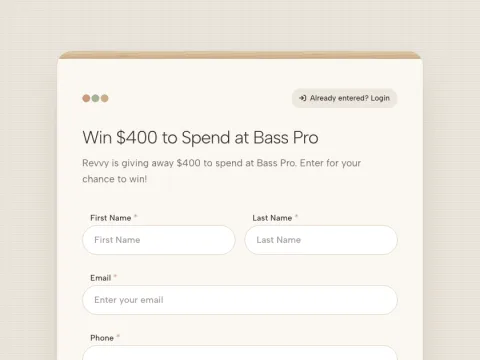
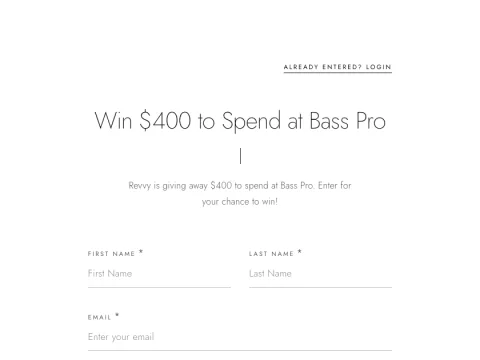
Nordic pairs warm neutrals with soft fields. Try it for a homeware giveaway, a furniture launch or a lifestyle newsletter. Boutique uses lighter typography, carefully spaced labels and a strong black button. It is a useful starting point for fashion or skincare promotions with their own product imagery.
The category also includes Classic, Clean SaaS, Swiss Minimal, Soft Neumorphic, Corporate, Material, Clinic and Aurora. Choose Classic if you want to keep the familiar Revup form. Choose a more distinctive style when you want the form itself to set the tone.
Elegant forms: give your form an editorial feel
Elegant styles use expressive typography, framing and texture. Pair them with a concise headline and a small number of strong images so the form does not become crowded.
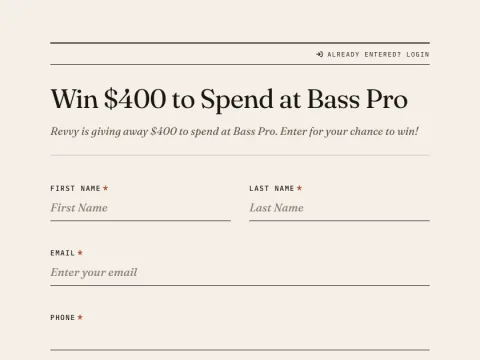
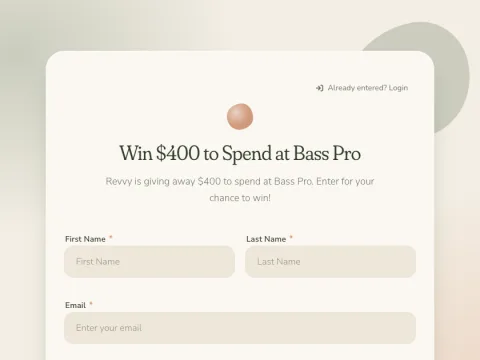
Editorial brings a magazine-like treatment to the page, with serif headlines and underlined fields. Consider it for a design-led collection or a travel giveaway. Organic uses softer shapes and earthy colors for a natural-food, gardening or wellness promotion.
Luxury, Broadsheet, Wedding, Zen, Dark Academia, Art Deco and Risograph offer other directions within this category. The names describe the visual treatment, so you can choose Wedding for an invitation-like look even when your promotion is about something else.
Bold forms: match energetic promotion creative
A restrained form can feel disconnected from a loud promotion poster. Bold styles bring heavier type, stronger outlines and more assertive color to the entry experience.
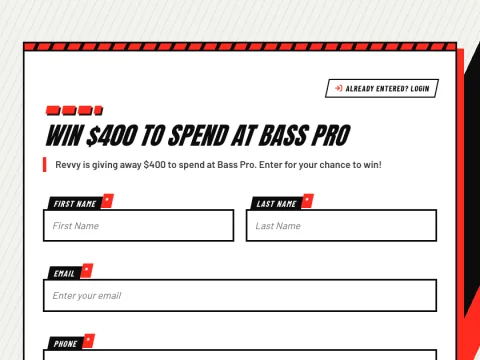
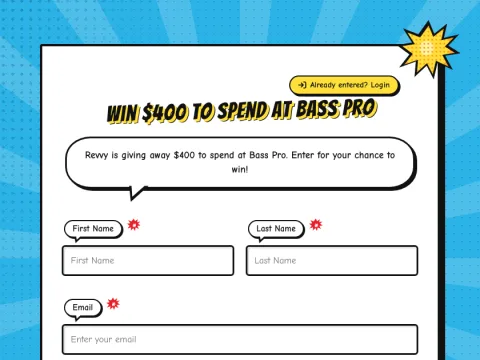
Athletic uses race-day typography and angled accents. It fits a running-club signup, sportswear launch or match-day giveaway. Comic Book turns the form into a set of illustrated panels, making it a candidate for collectibles, entertainment and playful product releases.
You can also explore Brutalist, Bauhaus, Punk Zine, Hazard, Sunset Pop and Monochrome. Keep the rest of your creative focused: a bold form rarely needs another busy background image competing with it.
Dark forms: build a different atmosphere
Dark styles range from quiet and minimal to bright and game-inspired. Choose based on the promotion's mood, then check how your logo and product images sit against the darker surface.
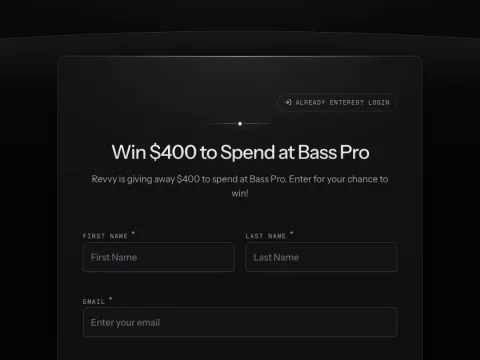
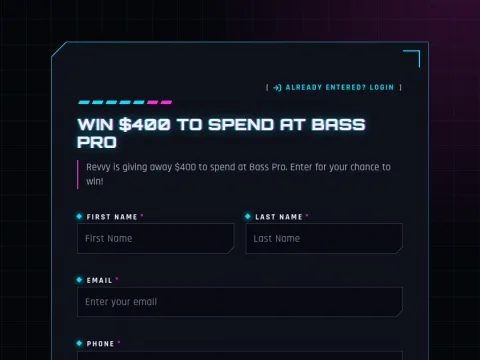
Midnight keeps the page understated with fine lines and graphite tones. Try it for an evening event or a premium technology launch. Esports uses angular panels and luminous edges for gaming communities or equipment giveaways.
Glass Dark, Retro Terminal, Deep Space and Scoreboard complete the category. A green terminal or stadium scoreboard is a strong visual choice; use it when that reference will make sense to your audience.
Playful forms: make the invitation feel personal
Playful styles bring familiar materials and friendly shapes into online form design. They can make a feedback request or community signup feel closer to the rest of a creative brand.
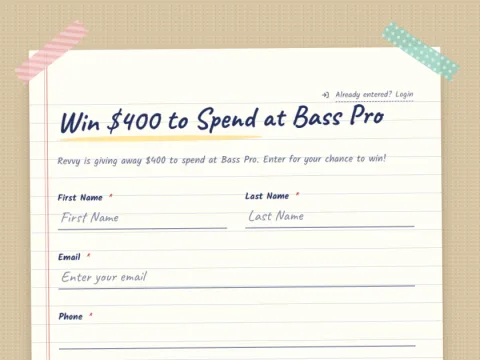
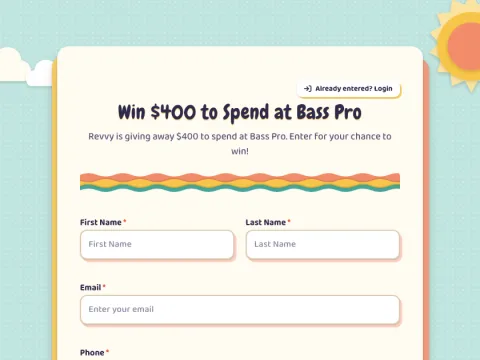
Stationery borrows from notebooks and handwritten forms. Consider it for a reading community, workshop signup or customer feedback form. Paper Cutout uses layered shapes and craft-like texture for arts, hobbies and colorful product launches.
Playful, Conversational, Chalkboard, Kawaii and Crayon provide other options. Conversational gives questions and replies a message-bubble appearance; it is a visual style, not an AI chatbot.
Retro forms: connect the design to a theme
A nostalgic style works best when it has a reason to be there: a vintage collection, an anniversary promotion, an arcade event or a prize with a matching story.
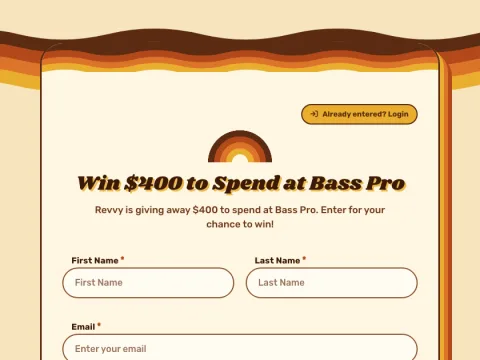
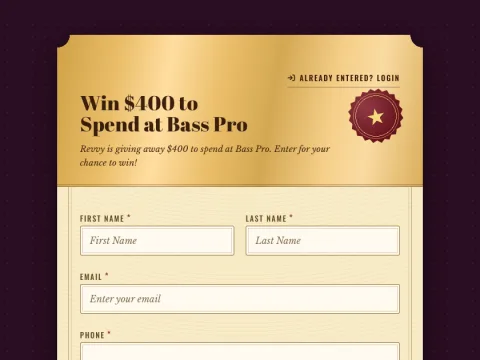
Groovy 70s pairs warm stripes with rounded shapes for vintage fashion or music-inspired promotions. Golden Ticket makes the entry page feel like an invitation to something special, such as a product experience or an event-prize giveaway.
Y2K Vaporwave, 8-bit Arcade, Memphis, Mid-Century, Diner and Retro OS round out the category. Golden Ticket changes the form's appearance; choose and configure your promotion mechanics separately.
Seasonal forms: carry the occasion through the entry page
If your promotion creative already celebrates a season, use the form to continue it. You can keep the same questions while giving a new promotion a different visual setting.
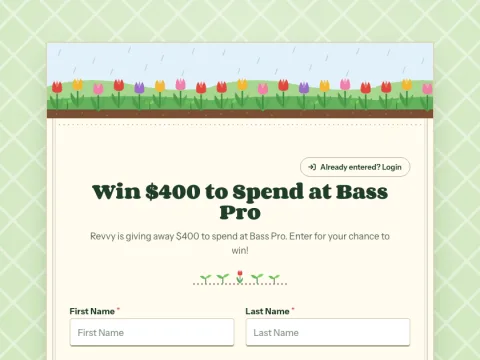
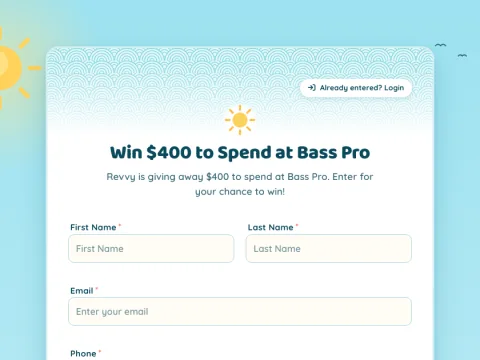
Spring Garden fits a planting-season giveaway or a fresh collection launch. Summer Beach brings a sun-and-surf setting to travel, outdoor and warm-weather promotions.
The eight seasonal styles are Winter Cozy, Winter Frost, Cherry Blossom, Spring Garden, Summer Beach, Tropical, Autumn Leaves and Fall Flannel. Choose the season your audience is experiencing, especially when a promotion runs across different regions.
Holiday forms: give each promotion its own look
Holiday styles supply decorative details that would otherwise take time to assemble. Start with the occasion, then add your brand colors where they work with the design.
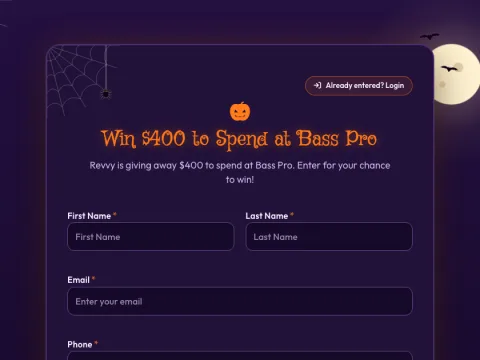
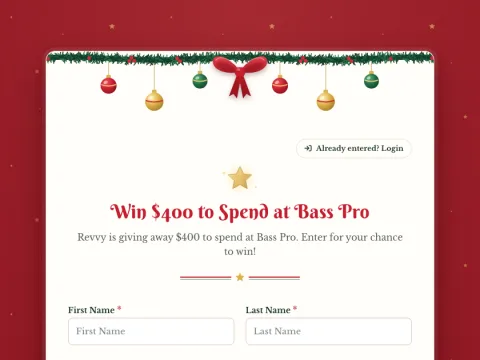
Halloween adds a moonlit, purple-and-orange atmosphere to an October promotion. Christmas uses a garland, ornaments and a ribbon treatment for a festive giveaway entry form.
The full holiday collection covers New Year's, Lunar New Year, Valentine's Day, St. Patrick's Day, Easter, Mother's Day, Father's Day, Fourth of July, Back to School, Halloween, Thanksgiving, Black Friday, Christmas and Hanukkah. For a promotion that runs well beyond a particular occasion, a seasonal or everyday style may stay relevant longer.
How to change your form style in Revup
- Open your promotion's Design tab. Find the Form style row in the Appearance card and choose Change style.
- Browse or search. Choose a category, or search by a style name, occasion or descriptive word.
- Preview a style. Select its thumbnail to see the design on your promotion. Where a style offers additional palettes, compare those too.
- Apply your choice. Select Use followed by the style name. Closing the picker without applying restores the saved preview.
- Make it yours. Adjust Colors, Typography and Layout using the controls available for that style. Add your own logo, images and promotion copy.
- Check the complete experience. Review desktop and mobile previews, long answers, required fields and the submit button before sharing the promotion.
Some fonts, borders or other design controls are fixed to preserve a style's defining look. The builder marks those controls as locked. Additional preset palettes vary by style; the seasonal and holiday collections start with their own occasion-specific colors, which you can refine in Colors.
Existing promotions keep Classic until you choose another style. Applying a style to a live promotion changes its saved appearance, so preview the choice before applying it. Returning to Classic applies Classic's starting design; it does not restore every customization you made before the switch.
Prefer to describe the changes you want? See how to build and edit promotions with RevAssist AI, including choosing a form style and refining its design.
Keep your branded form easy to complete
A distinctive look should still make the next step clear. Use these checks with any style:
- Keep the promise visible. Explain what people are signing up for, entering or answering near the top.
- Ask purposeful questions. If you cannot explain how you will use an answer, reconsider whether you need the field. See our guide to building an email list with sweepstakes for a more detailed entry-form plan.
- Check labels and contrast. Make sure labels, help text and buttons stay readable after you change colors. Do not rely on color alone to explain a required action or an error.
- Try the form on a phone. Read the longest label, open a dropdown and check that the button remains easy to find.
- Test an error and a successful submission. The form should make clear what needs correcting and what happens after completion.
The W3C's forms guidance is a useful reference for clear labels, instructions and feedback. A particular visual style alone does not establish accessibility or guarantee more entries.
Frequently asked questions about form styles
Do I need CSS to style a form?
No. You can preview and apply Revup's form styles in the builder, then use the available design controls to customize them. You do not need to write CSS to use the collection.
Are these 70 different form templates?
They are 70 visual styles, including Classic. They change how your promotion looks. You choose the promotion type, questions, prize details and other content separately.
Can I use my brand colors?
Yes. After applying a style, open Colors to adjust the palette. Some styles also offer preset palette variations. Check text and button readability as you make changes.
Which style should I use for a giveaway entry form?
Start with your prize and promotion creative. Nordic or Boutique can give product photography room to lead. Athletic suits a sports theme; Summer Beach or Christmas can carry an occasion through to the entry page. Preview two or three choices using the same copy and images before deciding.
Will a style change my form questions?
No. Applying a style changes design settings, including its starting colors, typography and layout. Your questions and content stay in place. Winner claim forms continue to use Classic.
Ready to find your look? Open Design → Change style in your promotion, or explore Revup's branded forms and promotion examples to plan what you want to build.