

A sponsored giveaway is one of the easiest things a local newsroom can sell. A sponsor puts up a prize, readers enter, and everyone hopes it worked. The difference between a one-off and a sponsor who renews is what happens around the entry form: the questions you ask readers, the permissions you collect, and the recap you hand the sponsor afterward.
This guide walks through one complete example: The Harbor Ledger, an example local paper, runs a Harbor Restaurant Week giveaway presented by Lakeview Credit Union. Readers enter in print, on the homepage and from the morning newsletter, answer a few questions about what they read, and choose separately whether to hear from the paper and from the sponsor.
Name the sponsor and say what happens to reader data
Name the sponsor in the official rules and on the entry form, and say plainly what the sponsor receives. If readers can opt in to hear from the sponsor, make that its own unchecked box and only pass along people who checked it.
What You’ll Build
The Harbor Ledger Restaurant Week giveaway
Sell
Your sales team agrees the prize, placements and recap with the sponsor.
Run
The giveaway appears in print, on the homepage and in the newsletter, each with its own tracking link.
Learn
Readers answer three short questions about what and how they read.
Draw
When entries close, you draw a winner and an alternate and send a claim form.
Report
The sponsor gets a recap of participation by placement and opt-ins, without reader details they weren’t promised.
Step 1: Agree the Sponsor Brief
Settle the details before anything goes to print. A short brief keeps sales, the newsroom and the sponsor on the same page:
Sponsor brief
- Prize, its value and who supplies it
- Entry dates and the drawing date
- Placements: print, homepage, newsletter, social
- What the sponsor receives: a participation recap by placement
- Whether readers can opt in to hear from the sponsor, and how those contacts are shared
- Who on your team owns the draw and the prize handoff
Step 2: Create the Giveaway
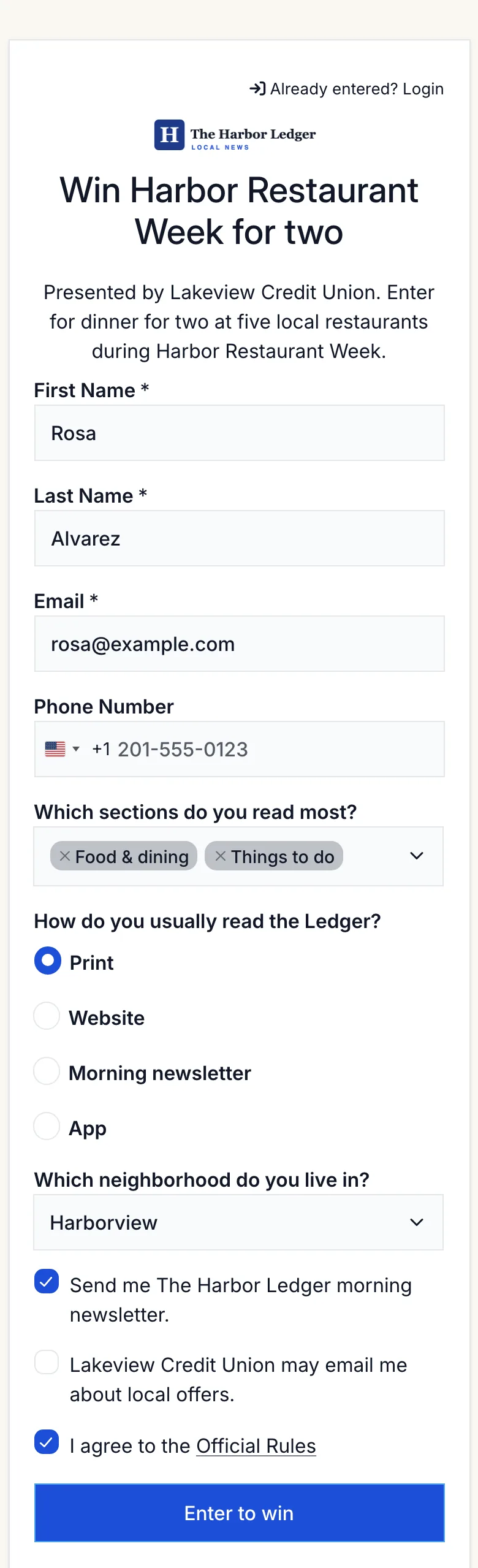
In the dashboard, select Create Promotion, choose Sweepstakes / Giveaway, then Start from scratch. Use a title readers recognize from the page, such as “Win Harbor Restaurant Week for two,” and put the sponsor in the description: “Presented by Lakeview Credit Union.”
Add the prize and set the entry period. Then add the sponsor’s logo or your own in Design, so the entry page looks like part of the paper. Review the generated official rules and make sure they name the sponsor.
Step 3: Add a Few Reader Questions
A giveaway is a rare chance to learn about readers at scale. Keep it to three optional questions so the form stays quick:
| Field | Type | Required? | Why |
|---|---|---|---|
| First and last name, email | Name, Email | Yes | Who entered, and where the claim form goes |
| Which sections do you read most? | Multiselect | No | Shows sponsors and editors what readers care about |
| How do you usually read the Ledger? | Multiple Choice | No | Print, website, newsletter or app |
| Which neighborhood do you live in? | Dropdown | No | Useful for local sponsors |
| Send me The Harbor Ledger morning newsletter. | Email Consent | No | Newsletter permission, unchecked by default |
| Lakeview Credit Union may email me about local offers. | Checkbox | No | A separate sponsor opt-in |
Want a fuller picture of your audience? Run a separate survey for longer questions. Surveys can be anonymous, so readers answer more honestly.
Step 4: Keep Every Permission Separate
Entering a giveaway isn’t permission to market to someone. Give each kind of follow-up its own unchecked box:
- Your newsletter: use an Email Consent field. If it’s on the form, Revup only sends a reader’s email to your connected email platform when they check it. See email consent.
- The sponsor: use a separate Checkbox with the sponsor’s name. It’s recorded with each entry, so you can share only the readers who checked it, if your rules say you will.
Step 5: Give Every Placement Its Own Link
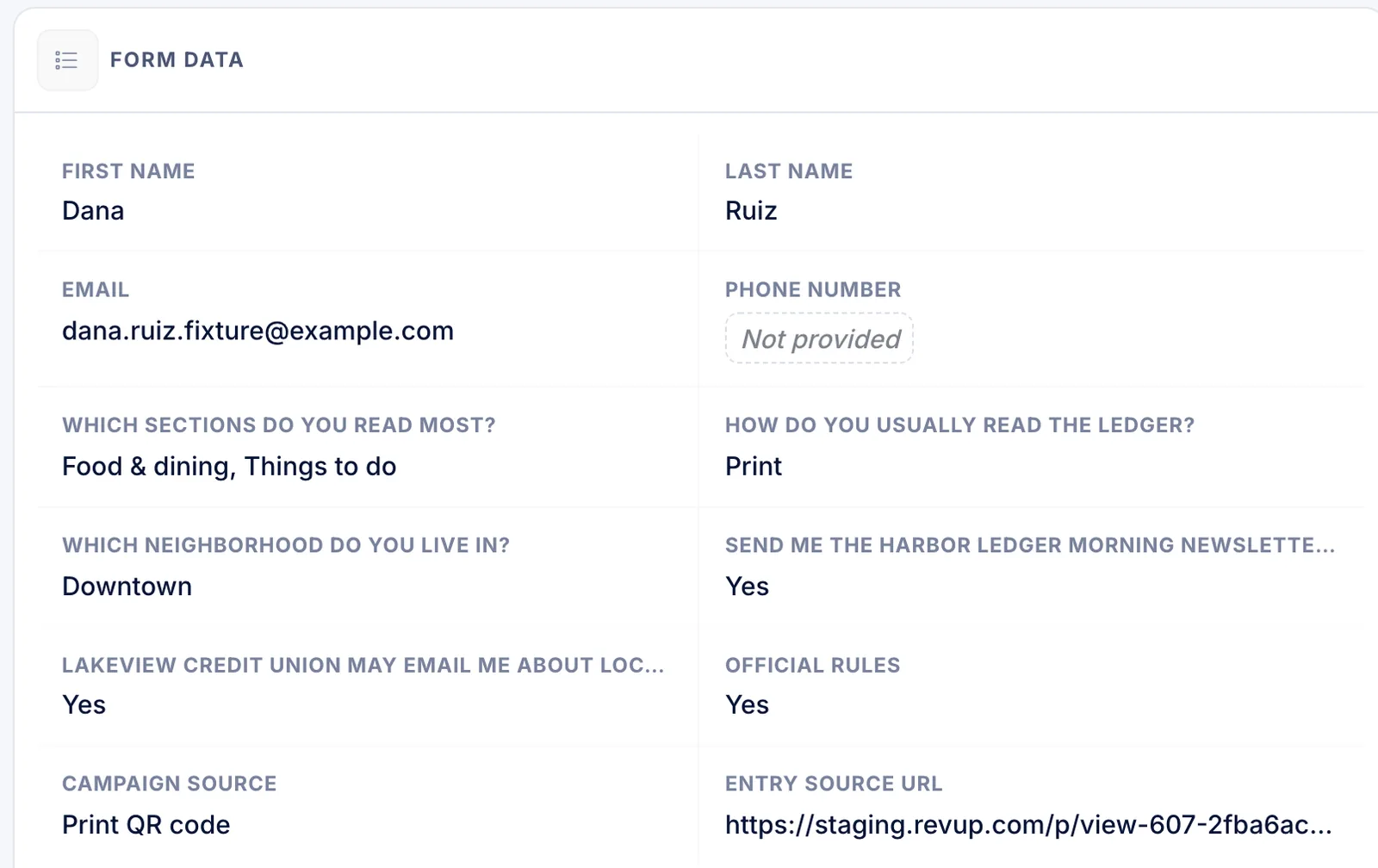
Open Share → Tracking links and add one link per placement. The Ledger uses three: Print QR code, Homepage banner and Morning newsletter. Download the QR code for the print ad from the same panel.
Each entry then shows the placement it came from, next to the reader’s answers and opt-ins:
See tracking links.
Step 6: Check Security for Shared Networks
New promotions start on Strict security, which allows one entry per IP address. Readers in the same office or on the same mobile network can share one, so choose Medium or Low and keep CAPTCHA on. Each email address can still enter only once. See security levels.
Step 7: Draw a Winner and Send the Claim Form
When entries close, open Winners → Draw Winners and draw one winner with an alternate. Send the claim form from the winner’s row; it gives the winner three days to respond, and you can extend the deadline. If they don’t respond, promote the alternate. Our ticket giveaway guide walks through each winner screen in detail.
Step 8: Build the Sponsor Recap
Sponsors renew when they can see what they paid for. Pull the recap from two places:
- Reporting → Campaign Tracking lists participants for each tracking link, so you can show how print, homepage and newsletter placements compared.
- Participants → Export gives you one row per entry with each answer and a Campaign Name column. Count the reader answers and opt-ins in a spreadsheet. See exporting participants.
Share totals, not names. A recap the Ledger could send Lakeview Credit Union looks like this:
| Recap line | Sample value | Where it comes from |
|---|---|---|
| Total entries | 1,851 | Participants |
| Entries by placement | Print 412 · Homepage 648 · Newsletter 791 | Campaign Tracking |
| Most-read sections among entrants | Food & dining, Things to do | Export, counted |
| Opted in to the sponsor’s offers | 23% | Export, sponsor checkbox |
| Opted in to the newsletter | 38% | Export, Email Consent |
The numbers above are a sample layout, not results. Entries measure reader participation, not ad revenue or print circulation.
What This Setup Doesn’t Do
- No automatic data sharing. Revup doesn’t send entrant details to sponsors. You decide what to share, based on what readers agreed to.
- No Best Of ballots. Revup doesn’t run nomination rounds, business categories or multi-round reader’s choice voting.
- No circulation or ad metrics. Reports cover visits and entries from your tracking links, not print readership or ad impressions.
Launch Checklist
Before the giveaway runs
- Sponsor brief agreed, including what the sponsor receives
- Sponsor named in the description and official rules
- Three optional reader questions or fewer
- Newsletter Email Consent and sponsor Checkbox, both unchecked
- One tracking link and QR code per placement
- Security level checked for shared networks, with CAPTCHA on
- A person assigned to the draw, claim and prize handoff
- Recap template ready for the sponsor
Running more than one kind of reader promotion? See our media and publisher contest ideas, or how Revup works for local news publishers.