

A home show booth can fill up all weekend and still leave you with a stack of leads you can’t use: people from outside your area, renters, and visitors who are years away from a project. The booth ideas that pay off give people a reason to stop, then find out quickly which projects fit before anyone picks up the phone.
This guide walks through one complete example: Hearth & Home Remodeling, an example remodeler, at booth 118 of the Lakeshore Home Show. Visitors scan a QR code and answer a few questions about their project on their own phone. No prize is needed.
Booth Ideas That Start the Right Conversations
- A QR code at eye level. Put it on the booth sign, not on the table, with one line that says what happens next: “Tell us about your project.”
- A reason to stop. Offer a free design consultation. If you want a crowd, add a prize wheel with an instant win and hand out small prizes on the spot.
- Before-and-after photos. Show real projects, and invite visitors to enter an “ugliest kitchen” photo contest after the show.
- A short form, not a long conversation. Let the form do the qualifying, so your team spends booth time with people whose projects fit.
What You’ll Build
Hearth & Home at the Lakeshore Home Show
Scan
Visitors scan the booth sign, the show program or the post-show email.
Qualify
They share the town, whether they own the home, the project and when they want to start.
Sort
After the show, your team sorts leads by fit and timing.
Follow up
Designers call the projects that fit first, and everyone else gets a reply.
Step 1: Create the Project Inquiry Form
In the dashboard, select Create Promotion → Form → Start from scratch. A form is enough for collecting leads. If you also want to give away a prize, use a giveaway instead, as in our trade show lead capture guide.
In Settings, set the dates to cover the show and the week after, so the post-show email still works. See creating a form.
Step 2: Ask Four Questions That Qualify a Project
Each answer helps decide whether, and how soon, to follow up:
| Field | Type | Required? | Why |
|---|---|---|---|
| First and last name, email | Name, Email | Yes | Who to follow up with |
| Phone number | Phone | No | For people who’d rather get a call |
| Which town is the project in? | Dropdown | Yes | List the towns you serve, plus “Somewhere else” |
| Do you own the home? | Multiple Choice | Yes | Yes, no or buying soon |
| What is the project? | Multiselect | Yes | Kitchen, bathroom, basement, addition or whole home |
| When would you like to start? | Multiple Choice | Yes | From within 3 months to just exploring |
| I would like a free design consultation. | Checkbox | No | A clear request for the next step |
| Send me remodeling ideas and show specials. | Email Consent | No | Marketing permission, unchecked by default |
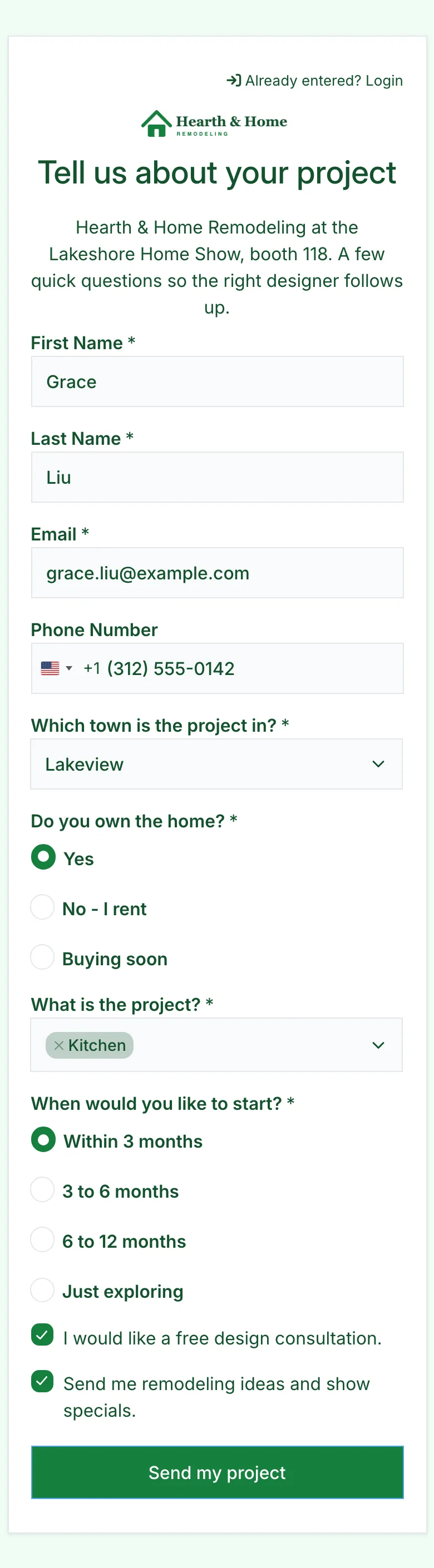
Skip budget questions at the booth. People often guess, and the timing question tells you more about how ready they are. See questions and answer choices.
Step 3: Show a Note When a Project May Not Fit
Add a Paragraph field after the town question that says you may not work in their area yet, and a Logic rule that shows it only when someone picks “Somewhere else.” Do the same after the ownership question with a note for renters.
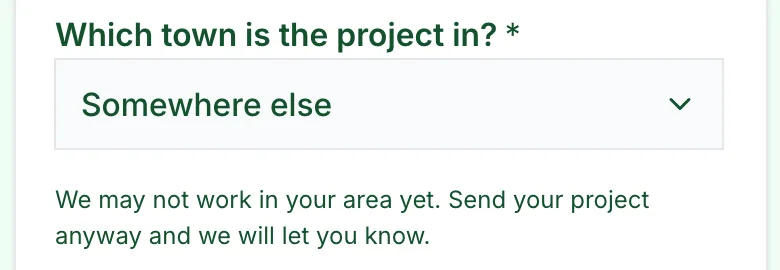
The note sets expectations. It doesn’t stop anyone from sending their project, so your team still decides who to call. See Logic.
Step 4: Give Each Placement Its Own QR Code
Open Share → Tracking links and add a link for each place visitors find you. Hearth & Home uses Booth sign, Show program and Post-show email, and prints the booth sign’s QR code large enough to scan from the aisle. See tracking links.
Running the form on a booth tablet? Lower the security level, because every visitor shares one connection, and tap Log out between visitors. Our trade show guide covers the tablet and Wi-Fi setup step by step.
Step 5: Sort Leads After the Show
Each lead keeps the answers and the placement it came from:
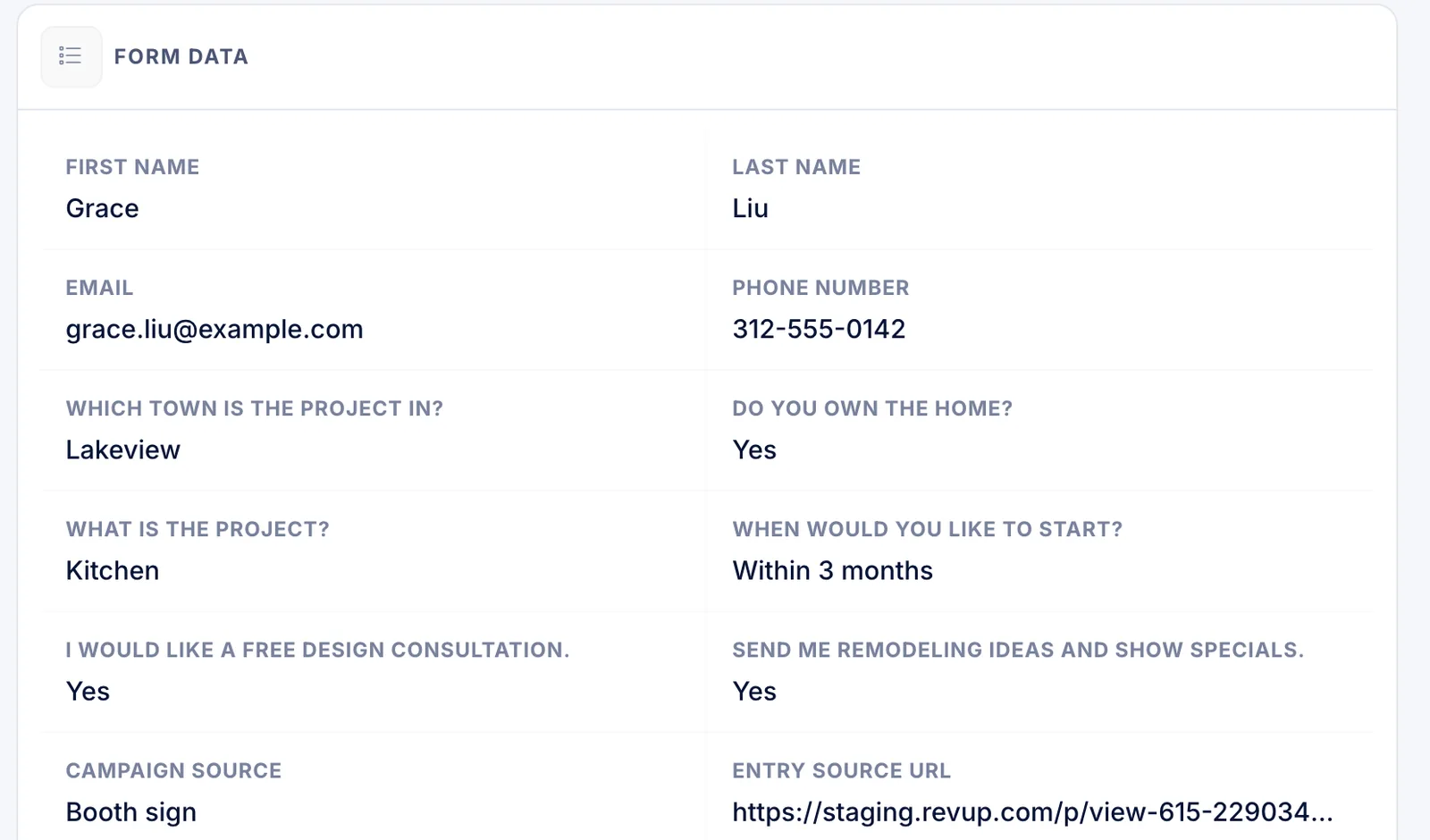
Select Export on the Participants list for a spreadsheet of every lead, then sort by town, ownership and timing. Revup doesn’t check addresses or ownership, so treat the answers as a starting point. Hearth & Home sorts its leads like this:
| Lead | Town | Owns the home? | Project | Start | Next step |
|---|---|---|---|---|---|
| Grace L. | Lakeview | Yes | Kitchen | Within 3 months | Designer calls within two days |
| Rosa D. | Cedar Ridge | Yes | Basement | Within 3 months | Designer calls within two days |
| Paul K. | Maple Grove | Buying soon | Kitchen | 6 to 12 months | Check in after closing |
| Ben T. | Somewhere else | Yes | Bathroom | 3 to 6 months | Reply about the service area |
| Nina P. | Brookside | No, rents | Kitchen | Just exploring | Thank-you email only |
Prefer leads in your CRM? Connect HubSpot or another supported platform, or send each lead to Zapier. If the form has an Email Consent field, only people who check it are synced to your email or CRM platform, so the export is the complete list. See exporting participants.
Post-Show Checklist
The week after the show
- Export every lead and sort by town, ownership and timing
- Call design consultation requests within two business days
- Reply to out-of-area projects, even if the answer is no
- Send the post-show email with its own tracking link
- Compare leads from the booth sign, program and email
- Track consultations booked and projects won in your CRM, not in Revup
What This Setup Doesn’t Do
- No estimates or scheduling. Revup collects project details. Your team prices the work and books consultations.
- No ownership or address checks. Answers are what visitors tell you. Confirm details during the consultation.
- No automatic service-area filter. The town question and Logic note set expectations; your team decides who to call.
- No offline mode. Each entry needs an internet connection, so keep the QR code visible for visitors to use their own phones.
See how Revup works for remodelers and home improvement companies, or build your booth form with Forms.